Seaflow Guide
1. 概述
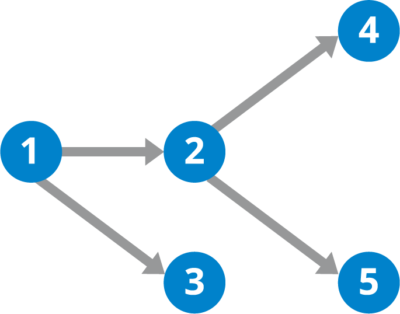
Seaflow是一个基于DAG的工作流调度引擎,旨在进行最自由的任务编排。思路来自于河流(Riverflow),DAG就是设定的河道,水流入之后就会沿着河道流动,任意的分叉或汇合。
DAG: 有向无环图

名词:
- DAG: 有向无环图,工作流定义
- Root Dag
- Sub Dag: 组成Root Dag的子Dag
- Node: 工作流节点,工作流定义的组成部分
- Action: Node上绑定的操作,也就是任务执行时要执行的操作
- Task: 任务,一个DAG的执行会产生Task
- Root Task:
- Sub Task: 执行子Dag产生的子任务
- Step: 步骤,任务的组成部分,Node的执行会产生Step
2. 特性
- Json DSL定义
- 流程定义
- Action输入/输出参数定义及校验
- Dag和Node的输入/输出参数适配
- Json Logic
- 任务嵌套与复用
- map/fission/分裂:
- 对输入参数中某一个数组类型的字段进行map,根据数组长度分裂出对应个数的子任务或者子步骤。
- 将多个子任务或子步骤的输出进行merge作为最终输出。
- reduce/iter/迭代:
- 对输入参数中某一个数组类型的字段进行迭代,根据数组长度迭代出对应个数的子任务或者子步骤。
- 也可以基于JsonLogic设置的持续条件进行迭代,直到不再满足迭代条件为止。
- 每次迭代的输出将作为下一次迭代的输入,以最后一次迭代的输出作为最终输出。
- loop/循环:
- 基于JsonLogic的持续条件进行循环,直到不再满足循环为止。
- 循环不会产生新的子任务或者子步骤。
- 以最后一次循环的输出作为最终输出。
- 执行优先级:分裂 –> 迭代 –> 循环
- callback/回调: 任务执行时可以传入callback配置参数,Root Task/Sub Task/Step的都可以设置callback,在状态发生改变时将会通过callback进行通知。
- 内部和外部Node:
- 内部Node: 将Action代码交给Seaflow托管,由Seaflow的worker执行。
- 外部Node: 由用户程序自己订阅Seaflow的调度服务,收到触发的Step后执行完毕并调用FinishStep接口将结果返回给Seaflow。
- 人工Node: 外部Node的设定可以让Seaflow支持人工Node,当任务执行到外部Node时,通过人为触发调用FinishStep接口来完成Step的执行。
- 上下文:一个只读变量,作为任务参数传入,可以随时读取。
- 日志: 内部Node可以在托管的Action代码中调用的seagull变量(海鸥)来记录Step Log,外部Node也可以通过API来上传Step Log。提供日志获取API。
Seaflow现在只有Python的实现,作为一个Python的依赖库安装使用。将来会封装成一个提供Rest API的Web服务,也会提供其他语言版本的实现和客户端sdk。
Demo
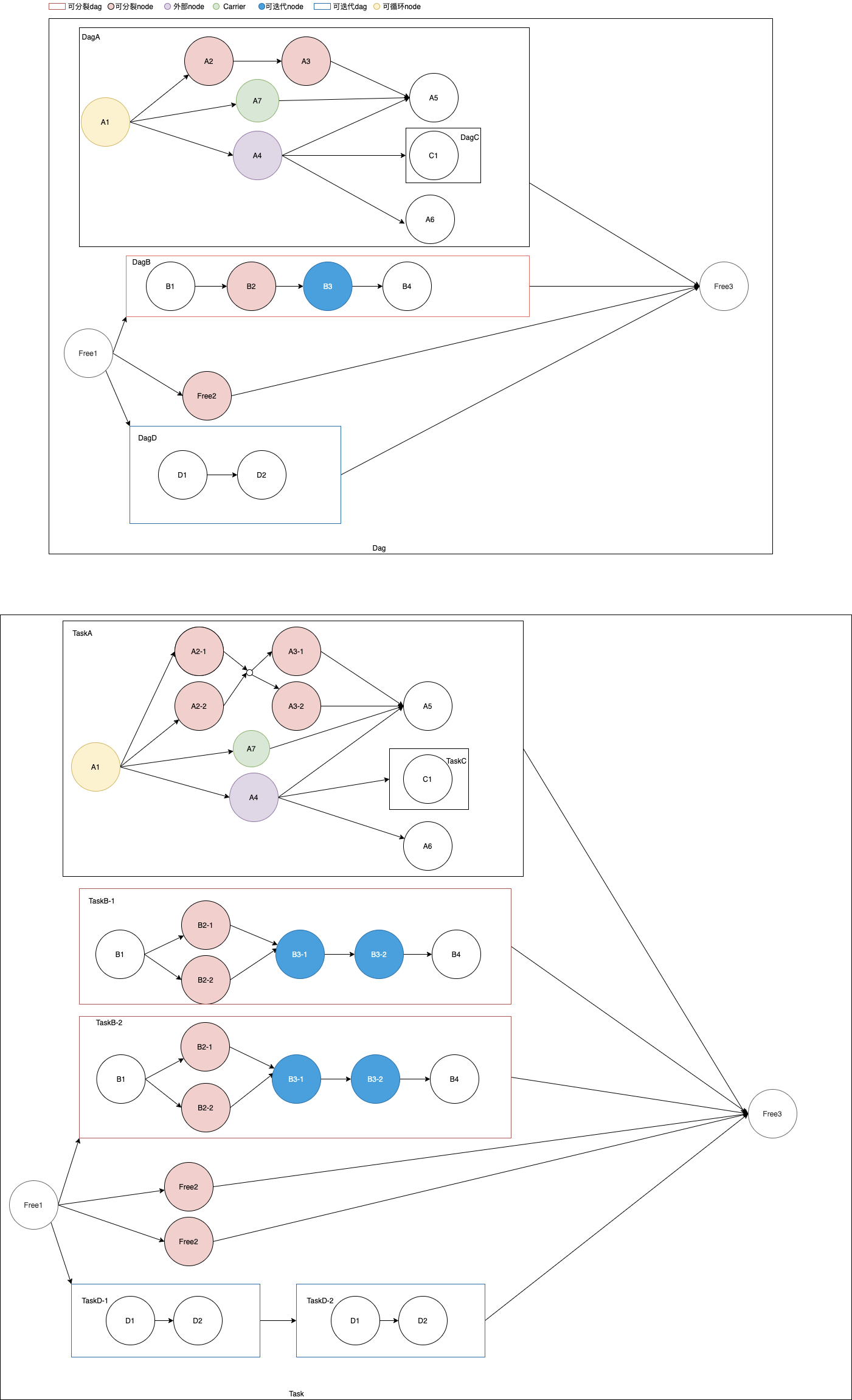
- 可分裂DAG: 执行时,分裂出多个Task并行处理, 达到map的效果。如DagB
- 可分裂Node: 执行时,分裂出多个Step并行处理,达到map的效果。如A2, A3, B2, Free2
- 外部Node:Step的执行和完成交由外部调用者,而不是执行托管在Seaflow上的代码。如A4
- Carrier: 参数搬运工,只负责搬运参数,而不执行具体逻辑,用于隔段传递参数。比如A1的输出有a和b两个参数,A4的输入只有参数a,丢失了参数b,但是A5的执行依赖参数b,所以可以通过Carrier Node A7来传递参数b
- 可迭代Dag: 执行时,迭代出多个Task串行处理。如DagD
- 可迭代Node: 执行时,迭代出多个Step串行处理。如B3
- 可循环Node: 循环执行同一个Step, 直到不再满足循环持续条件。如A1
3. Dag定义
3.1 Param
ParamType, 参数类型
- String: 字符串
- Number: 数字,包括int, float等数字类型
- Boolean: 布尔类型
- Array: 数组类型,同JsonArray
- Object: 对象类型,同JsonObject
ParamDefinition, 参数定义
- type: ParamType
- required: true/false, 是否必须
- default: 默认值
{
  "a": {"type": "Array", "required": false},
  "o": {"type": "Object", "required": false},
  "n": {"type": "Number", "required": false, "default":  1},
  "b": {"type": "Boolean", "required": false},
  "s": {"type": "String", "required": false}
}
ParamAdapter, 参数适配器
用于适配前面task/step的输出和后面task/step的输入, 基于JSONPath
{
  "n": "$.o.n", // 取Object类型的变量o中的字段n的值
  "s": "$.a[0]" // 取Array类型的变量a中的第一个元素
}
3.2 Action
action是基本的职能单元,负责实现具体的逻辑。
[
  {
    "name": "action",
    "type": "Default",
    "func": "apps.pipeline.actions.test.action",
    "input_def": {
      "a": {"type": "Array", "required": false},
      "o": {"type": "Object", "required": false},
      "n": {"type": "Number", "required": false, "default":  1},
      "b": {"type": "Boolean", "required": false},
      "s": {"type": "String", "required": false}
    },
    "output_def": {
      "a": {"type": "Array", "required": false},
      "o": {"type": "Object", "required": false},
      "n": {"type": "Number", "required": false},
      "b": {"type": "Boolean", "required": false},
      "s": {"type": "String", "required": false, "default": ""}
    }
  },
  {
    "name": "external-action",
    "type": "External",
    "input_def": {
      "a": {"type": "Array", "required": false},
      "o": {"type": "Object", "required": false},
      "n": {"type": "Number", "required": false, "default":  1},
      "b": {"type": "Boolean", "required": false},
      "s": {"type": "String", "required": false}
    },
    "output_def": {
      "a": {"type": "Array", "required": false},
      "o": {"type": "Object", "required": false},
      "n": {"type": "Number", "required": false},
      "b": {"type": "Boolean", "required": false},
      "s": {"type": "String", "required": false, "default": ""}
    }
  },
  {
    "name": "carrier-action",
    "type": "Carrier",
    "input_def": {
      "a": {"type": "Array", "required": false},
      "o": {"type": "Object", "required": false},
      "n": {"type": "Number", "required": false},
      "b": {"type": "Boolean", "required": false},
      "s": {"type": "String", "required": false}
    },
    "output_def": {
      "a": {"type": "Array", "required": false},
      "o": {"type": "Object", "required": false},
      "n": {"type": "Number", "required": false},
      "b": {"type": "Boolean", "required": false},
      "s": {"type": "String", "required": false}
    }
  }
]
name
不可重复
type
- Default: 默认类型,有具体的函数,使用@Seaflow.action装饰器修饰
- Carrier: 搬运工,用于Carrier节点
- External: 外部action,用于外部节点
func
type=Default时,需要定义具体的执行函数
from seaflow.base import Seaflow

@Seaflow.action()
def action(self, **params):
    print(json.dumps({'root': self.root.name if self.root else None,
                      'task': self.task.name,
                      'step': self.step.name}))
    if self.step.node.name == 'd1' and self.step.retries < self.step.config.get('max_retries', 0):
        1/0
    return {
        'state': StepStates.SUCCESS,
        'data': {
            'a': [1, 2],
            'o': {'o': 'o'},
            'n': 1,
            's': 's',
            'b': True
        }
    }
input_def
输入参数定义
output_def
输出参数定义
3.3 Root Dag
{
  "identifier": "dag-root-x",
  "name": "Root-x",
  "version": 1,
  "input_adapter": {
    "n": "$.n",
    "a": "$.a"
  },
  "output_adapter": {
    "root": "$.free3"
  },
  "components": [
    // ...
  ]
}
identifier
在dag定义中的唯一标识,用于表达各种dag与node的编排关系时的引用id
name
名称,与version联合唯一
version
版本,与name联合唯一
input_adapter
输入适配器,ParamAdapter
output_adapter
输出适配器,ParamAdapter
components
组件列表,包括sub dags/nodes
3.4 Sub Dag
{
  "identifier": "dag-a",
  "kind": "Dag",
  "name": "A",
  "ref": "Dag-exists-1.2",
  "parent": "dag-root-x",
  "fission": {
    "key": "$.a"
  },
  "iter": {
    "key": "$.arr1",
    "condition": {
      "or": [
        {"!": {"var": "output.n"}},
        {"<=": [{"var": "index"}, 5]}
      ]

    }
  },
  "input_adapter": {
    "n": "$.a"
  },
  "output_adapter": {
    "b": "$.b"
  },
  "previous_nodes": ["node-x"],
  "previous_dags": ["dag-x1", "dag-x2"]
}
identifier
kind
类型,Dag
name
ref
{name}.{version}, 引用/复用数据库中已存在的root dag的components
parent
所属dag的identifier,如果为空则直属于root dag
fission
分裂配置,不传则不可分裂
- key: 必传,指定的分裂key(适配前),基于JSONPath
iter
迭代配置,不传则不可迭代
- key: 和condition至少传一个,指定的迭代key(适配前),基于JSONPath
- condition: 和key至少传一个,迭代持续条件,基于JSONLogic
- countdown: 每次进行下一次循环前, 等待的时长(s)
input_adapter
output_adapter
previous_nodes
关联关系,数组元素是node的identifier
previous_dags
关联关系,数组元素是sub dag的identifier
3.5 Node
{
  "identifier": "node-a",
  "kind": "Node",
  "name": "a",
  "dag": "dag-a",
  "action": "action",
  "fission": {
    "key": "$.arr2"
  },
  "iter": {
    "key": "$.arr1",
    "condition": {
      "or": [
        {"!": {"var": "output.n"}},
        {"<=": [{"var": "index"}, 5]}
      ],
      "countdown": 3
    }
  },
  "loop": {
    "key": "$.arr2",
    "condition": {
      "and": [
        {"<": [{"var": "index"}, 3]},
        {"==": [{"var": "output.a1.0"}, 1]}
      ]
    },
    "countdown": 3
  },
  "timeout": 60.0,
  "retry": {
    "max_retries": 0,
    "countdown": 1
  },
  "input_adapter": {
    "n": "$.n"
  },
  "output_adapter": {
    "a1": "$.a"
  },
  "previous_nodes": ["node-x"],
  "previous_dags": []
}
identifier
kind
类型,Node
name
parent
所属的dag的identifier,如果为空则直属于root dag
action
职能action的name
fission
iter
loop
循环配置,不传则不可循环
- key: 和condition至少传一个,指定的循环的key(适配前),基于JSONPath
- condition: 循环持续条件,基于JSONLogic
- countdown: 每次进行下一次循环前, 等待的时长(s)
timeout
超时时间(s)
retry
重试配置, 不传则不可重试
- max_retries: 最大重试次数
- countdown: 每次重试的等待时间
input_adapter
output_adapter
previous_nodes
关联关系,数组元素是node的identifier
previous_dags
关联关系,数组元素是sub dag的identifier
3.6 加载Dag定义
加载Action定义
from seaflow.base import Seaflow

actions = []
Seaflow.load_actions(actions)
加载Dag定义
from seaflow.base import Seaflow

dag = {}
Seaflow.load_dag(dag)
print(Seaflow.dump_dag_dsl(dag_name='BuildPackDeploy', dag_version=1, root_identifier='root'))
4. 安装与启动
4.1 系统架构
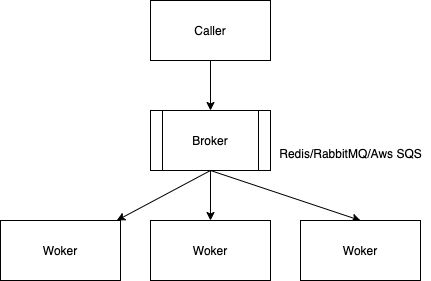
seaflow底层基于django.db.models和异步任务调度框架Celery
4.2 安装
pip install seaflow
4.3 基于django框架的seaflow服务启动
- 在django中配置Celery
- 在django settings.INSTALLED_APPS中添加seaflow
# ... INSTALLED_APPS = [ # ... 'seaflow' ] - 为seaflow设置celery app
import os import django from celery import Celery import seaflow # # django settings os.environ.setdefault('DJANGO_SETTINGS_MODULE', 'settings') django.setup() # # celery app definition app = Celery() app.config_from_object('django.conf:settings', namespace='CELERY') # # set celery app for seaflow seaflow.set_celery_app(app) # # discover your action definitions seaflow.autodiscover_actions(packages=['xxx'], related_name='actions', force=True) - 启动celery worker
celery -A {your celery app name} worker --concurrency=3 -E -l info
5. 任务的执行与控制
5.1 Config
TaskConfig
- countdown
- timeout
- max_retries
- retry_countdown
- callback
StepConfig
- countdown: 执行前的倒数时间
- timeout: 超时时间, 覆盖Node定义中的timeout参数
- max_retries: 最大重试次数,覆盖Node定义中的retry.max_retries参数
- retry_countdown: 重试倒数时间,覆盖Node定义中的retry.countdown参数
- callback: CallbackConfig,回调配置
CallbackConfig
- is_async: 是否异步
- func: 回调函数
5.2 创建Task
Seaflow.create_task()
def create_task(dag_id=None, dag_name=None, dag_version=None, name=None,
           inputs=None, context=None, config=None, tasks_config=None, steps_config=None):
    """
    :param dag_id:
    :param dag_name:
    :param dag_version:
    :param name:
    :param inputs:
    :param context:
    :param config: TaskConfig, root task配置
    :param tasks_config: {<dag_name>: TaskConfig}, sub task配置
    :param steps_config: {<node_name>: StepConfig}, step 配置
    :return: SeaflowTask
    """
Demo
import seaflow
from seaflow import Seaflow

seaflow.set_celery_app(celery_app)
task = Seaflow.create_task(dag_name='Root-x',
                           dag_version=1,
                           name='this is my task',
                           inputs={'n': 1},
                           context={'creator': 'chenjian'},
                           config=TaskConfig(
                               countdown=1,
                               callback=CallbackConfig(
                                   is_async=True,
                                   func='apps.pipeline.pipeline_utils.test_callback'
                               )
                           ),
                           tasks_config={
                               'A': TaskConfig(
                                   countdown=1,
                                   callback=CallbackConfig(
                                       is_async=True,
                                       func='apps.pipeline.pipeline_utils.test_callback'
                                   )
                               ),
                               'D': TaskConfig(
                                   countdown=1,
                                   callback=CallbackConfig(
                                       is_async=True,
                                       func='apps.pipeline.pipeline_utils.test_callback'
                                   )
                               )
                           },
                           steps_config={
                               'd1': StepConfig(
                                   countdown=1,
                                   max_retries=2,
                                   retry_countdown=1,
                                   callback=CallbackConfig(
                                       is_async=True,
                                       func='apps.pipeline.pipeline_utils.test_callback'
                                   )
                               )
                           })
5.3 执行Task
task.apply()
5.4 状态
TaskStates
- PENDING: 等待中, 任务刚创建时等待执行的状态
- PROCESSING: 正在执行
- SLEEP: 休眠
- RETRY: 等待重试, 任务失败后等待重试时的状态
- TIMEOUT: 超时
- SUCCESS: 成功
- ERROR: 错误
- REVOKE: 撤销
- TERMINATE: 终止
StepStates
- PENDING: 等待中
- PUBLISH: 已发布, 外部节点产生的step进入PUBLISH的状态后,可以被订阅获取,被获取后状态变为PROCESSING
- PROCESSING: 正在执行
- SLEEP: 休眠
- RETRY: 等待重试
- TIMEOUT: 超时
- SUCCESS: 成功
- ERROR: 错误
- REVOKE: 撤销
- TERMINATE: 终止
5.5 睡眠
task.sleep()
- root task和正在执行的sub tasks的状态置为TaskStates.SLEEP
- step执行前会先检测所属task的状态,如果是TaskStates.SLEEP则自己也会进入睡眠
- 执行中的step将会继续执行
5.6 唤醒
task.awake()
睡眠状态的task和step会被唤醒,继续执行
5.6 撤销
task.revoke()
使用温柔的方式停止任务
- root task和正在执行的sub tasks的状态置为TaskStates.REVOKE
- step执行前会先检测所属task的状态,如果是TaskStates.REVOKE则不再执行
- 执行中的step将会继续执行
5.7 终止
task.terminate()
使用粗暴的方式停止任务
- seaflow会强制杀死正在执行的step所在的worker进程
6. 外部Node
由用户程序自己订阅Seaflow的调度服务,领取派发的Step后执行完毕并调用FinishStep接口将结果返回给Seaflow。
6.1 Dispatch
派发外部step,订阅者通过订阅获取到”已发布”状态的外部step,再执行派发
Seaflow.dispatch_external_step(step_id=step_id, identity={})
- identity: 订阅者的身份信息
- name: 身份名称
- key: 身份密钥
6.2 订阅(待实现)
6.3 Finish
Seaflow.finish_external_step(step_id=step_id, outputs={})
- outputs: 未经适配前的输出参数
6.4 Fail
Seaflow.fail_external_step(step_id=step_id, error="error message", outputs={})
7. Callback
执行过程中当root task/sub task和step的状态发生改变时都会执行回调
回调配置
见CallbackConfig
回调参数
- event: 以TASK_和STEP_开头,用于区分task和step的回调,例如TASK_STATE_SUCCESS
- data: task或step的json数据
def on_callback(event, data):
  print(event, data)
8. 日志
seaflow.seagull.Seagull是seaflow的日志处理类,seagull是海鸥的英文单词,寓意为记录消息的海鸟
记录日志
seagull.debug()
seagull.info()
seagull.warn()
seagull.error()
日志buffer
可配置(待实现)
持久化存储(待实现)
- 有效期内的日志存储在mysql中
- 过期日志存储到s3,支持refetch
9. 机制解析
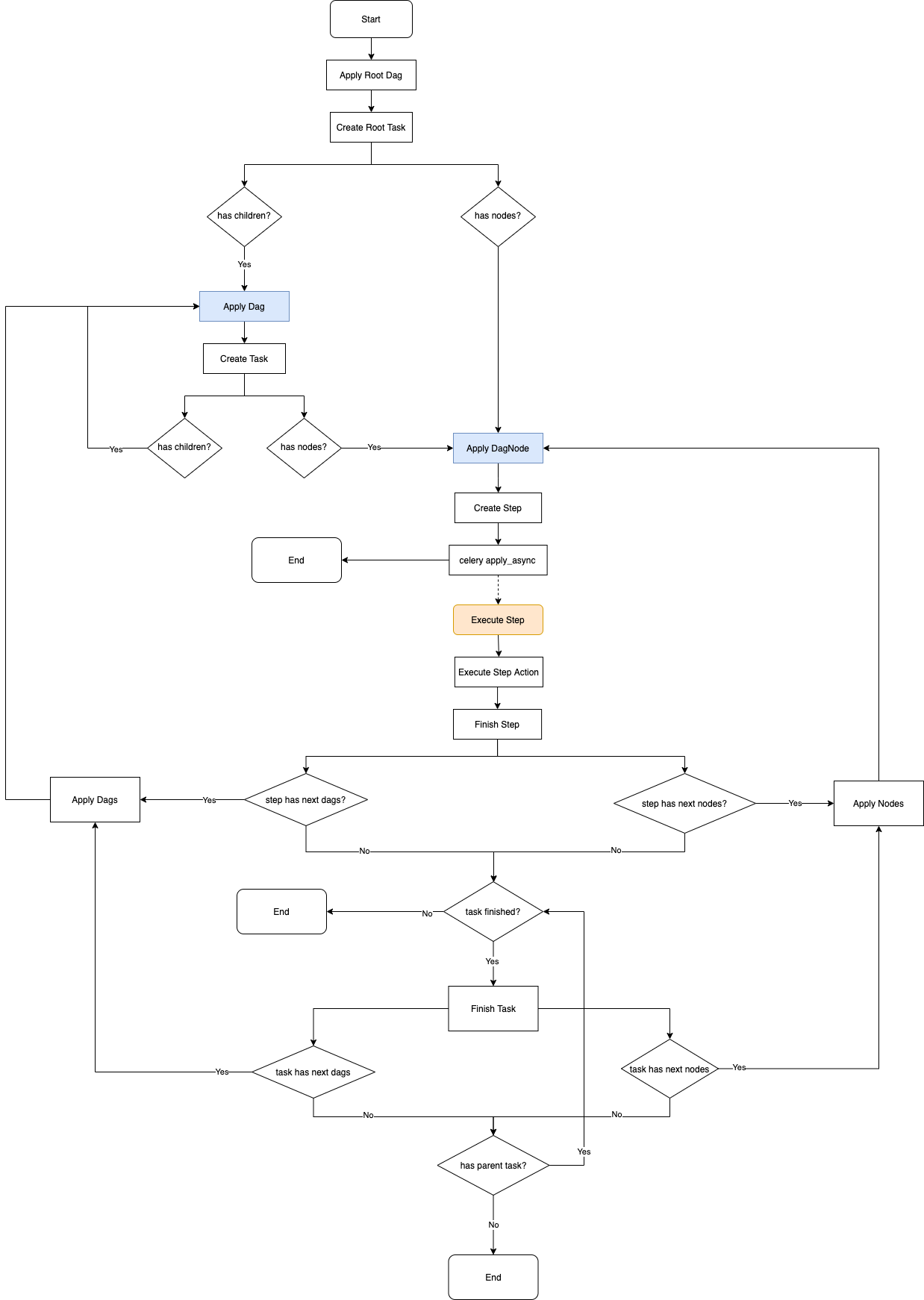
9.1 Seaflow核心处理流程
仅供辅助阅读源码使用
9.2 任务执行过程中output参数的merge
相同的key,merge后的值为array
- merge outputs of previous tasks and nodes
{
  "a": [1, 2],
  "b": true,
  "s": "hello",
  "o": {"x": "y"}
}
// merge with
{
  "a": [3, 4],
  "n": 1,
  "s": "world",
  "o": {"x": "z"}
}
// we get
{
  "a": [[1, 2], [3, 4]],
  "b": true,
  "n": 1,
  "s": ["hello", "world"],
  "o": [{"x": "y"}, {"x": "z"}]
}
- merge outputs of fissioned tasks and nodes
{
  "a": [1, 2],
  "b": true,
  "n": 1,
  "s": "hello",
  "o": {"x": "y"}
}
// merge with
{
  "a": [3, 4],
  "b": true,
  "n": 1,
  "s": "world",
  "o": {"x": "z"}
}
// we get
{
  "a": [[1, 2], [3, 4]],
  "b": [true, true],
  "n": [1, 1],
  "s": ["hello", "world"],
  "o": [{"x": "y"}, {"x": "z"}]
}
9.3 Fission
输入参数处理流程
// input before adaption
{
  "a1": [1, 2, 3],
  "s": "hello",
  "a2": [2, 4, 6]
}
如果fission key是a1, 则将会分裂出3个子任务或3个步骤,未适配前的输入参数分别为
// input before adaption
{
  "a1": 1,
  "s": "hello",
  "a2": [2, 4, 6]
}
{
  "a1": 2,
  "s": "hello",
  "a2": [2, 4, 6]
}
{
  "a1": 3,
  "s": "hello",
  "a2": [2, 4, 6]
}
9.4 Iter
配置了iter key时的参数处理流程
// input before adaption
{
  "a1": [1, 2, 3],
  "s": "hello",
  "a2": [2, 4, 6]
}
如果iter key是a1, 则将会迭代出最多3个子任务或者步骤(如果设置了迭代持续条件,则可能会少于3个), 未适配前的输入参数分别为
// input before adaption
{
  "a1": 1,
  "s": "hello",
  "a2": [2, 4, 6]
}
{
  "a1": 2,
  "s": "hello",
  "a2": [2, 4, 6]
}
{
  "a1": 3,
  "s": "hello",
  "a2": [2, 4, 6]
}
9.5 Loop
配置了loop key时的参数处理流程
// input before adaption
{
  "a1": [1, 2, 3],
  "s": "hello",
  "a2": [2, 4, 6]
}
如果loop key是a1, 则同一个step将会执行3次(如果设置了迭代持续条件,则可能会少于3次), 未适配前的输入参数分别为
// input before adaption
{
  "a1": 1,
  "s": "hello",
  "a2": [2, 4, 6]
}
{
  "a1": 2,
  "s": "hello",
  "a2": [2, 4, 6]
}
{
  "a1": 3,
  "s": "hello",
  "a2": [2, 4, 6]
}